Add LinkedIn profiles to HubSpot in one click
SyncToCRM puts an Add to HubSpot button on every LinkedIn profile and shows who's already in your CRM.Without duplicates. Without overwriting a single field.
- Free while in beta
- No Sales Navigator needed
- Reads only the page you have open



How it works
From profile to contact in three steps
No exports, no copy and paste, no switching tabs.
Open a profile
Browse LinkedIn as usual. SyncToCRM checks HubSpot by the profile's address and shows the answer on the page.
Click Add to HubSpot
Name, title, company, location and LinkedIn address are saved, the company is linked, and your defaults are applied: owner, lifecycle stage, list.
Carry on prospecting
The button turns into View in HubSpot. Next time you open the profile, you'll see the owner and the last activity.
Why SyncToCRM
One job, done properly
Adding someone from LinkedIn to your CRM should take one click and leave your data cleaner than before. That's what SyncToCRM is for.
Before you reach out
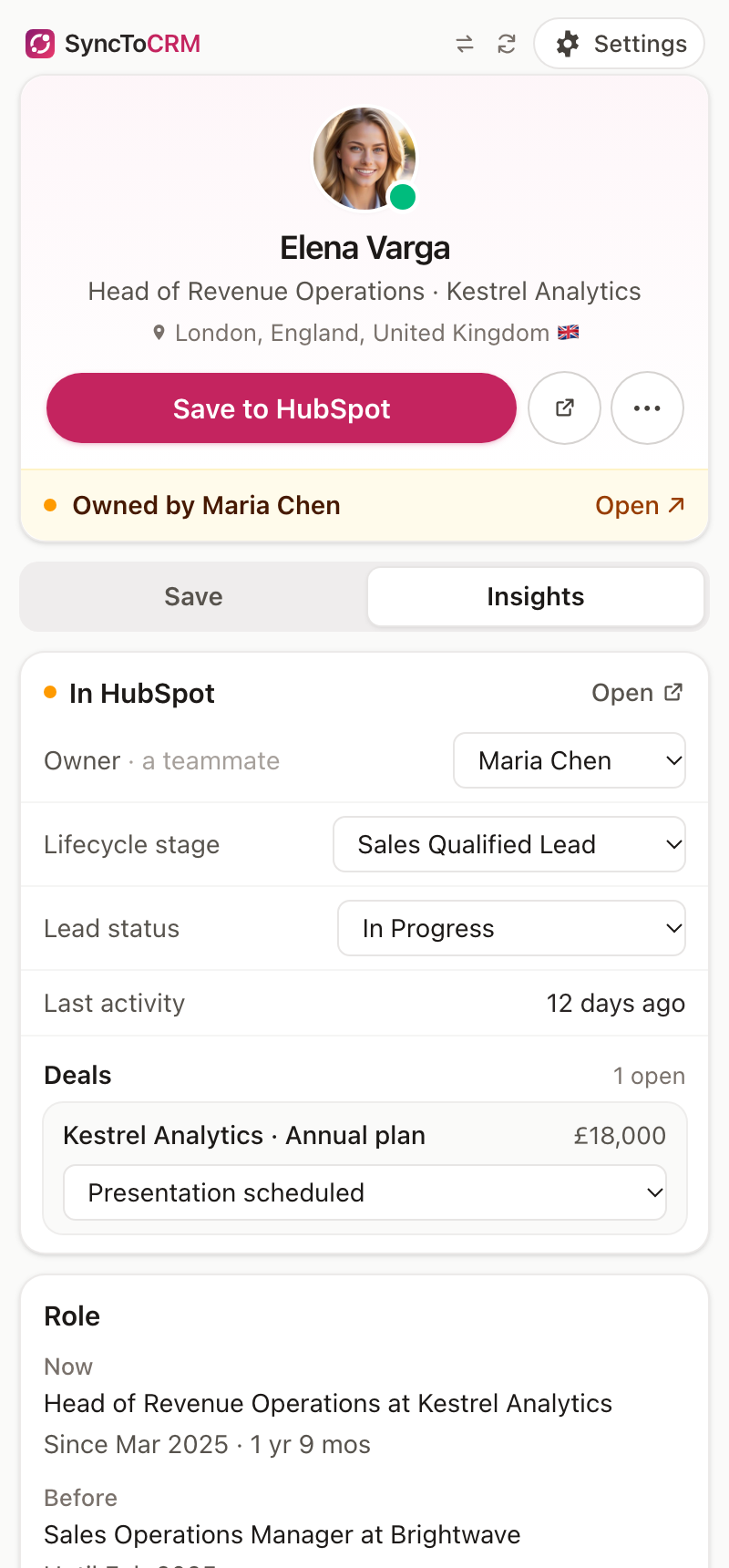
Know who's already in HubSpot, and who owns them
Open any profile and see at once whether the person is in your CRM. The Insights tab shows the owner, lifecycle stage, lead status, last activity and open deals, and you can change them right there.
- View in HubSpot replaces Add on people you already have
- A warning when a teammate owns the contact, so two people don't reach out
- Colleagues from the same company who are already in HubSpot
Clean data
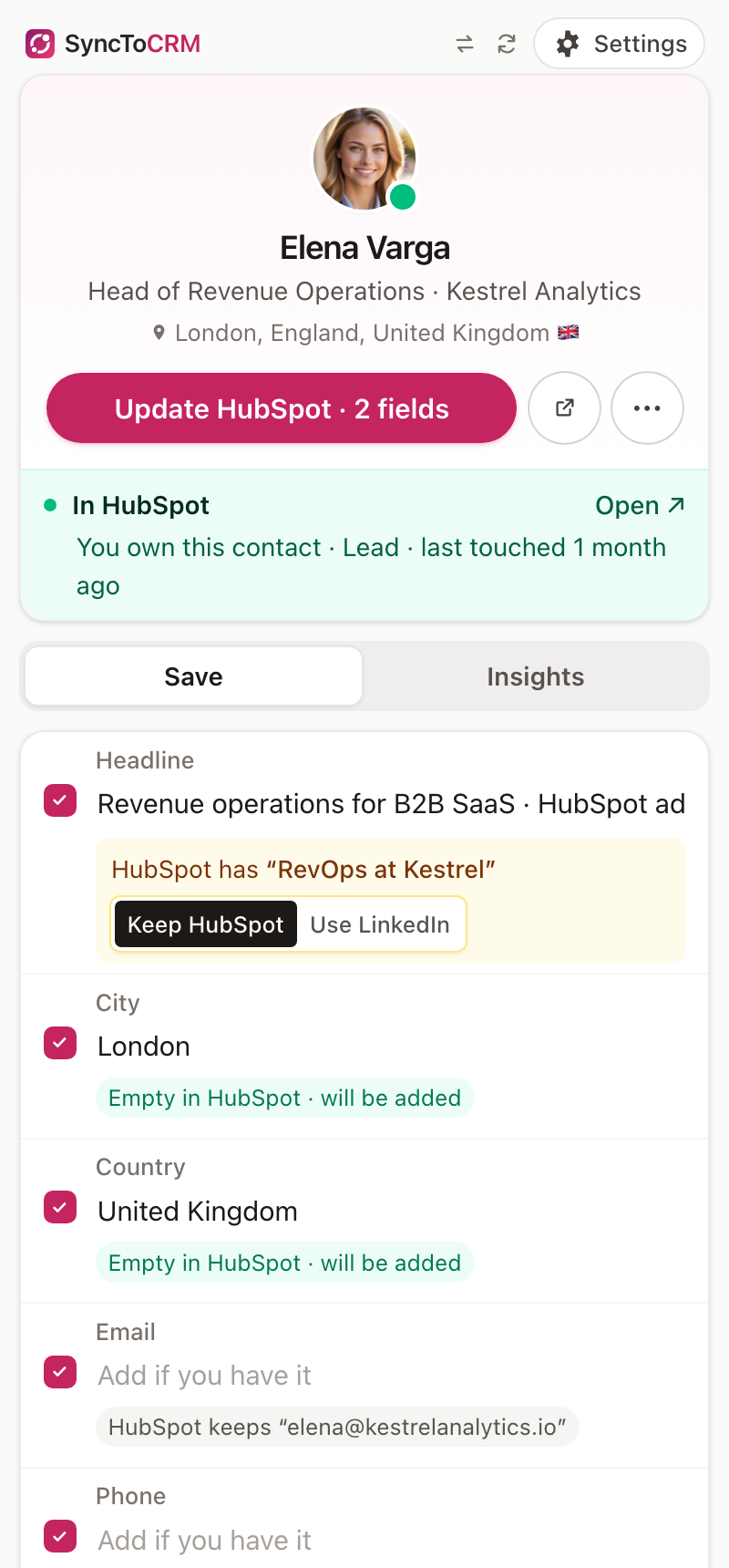
Your CRM stays the way you left it
SyncToCRM never empties a field. When HubSpot and LinkedIn disagree, it shows both and keeps HubSpot's unless you choose LinkedIn's. Empty fields get filled. Nothing else changes.
- Looks for the person by LinkedIn address, member ID and email, then again right before saving
- Same name but no proof it's the same person? It asks instead of guessing
- Companies matched by LinkedIn page, website or name. Look-alikes are shown, never linked by guess
Fresh records
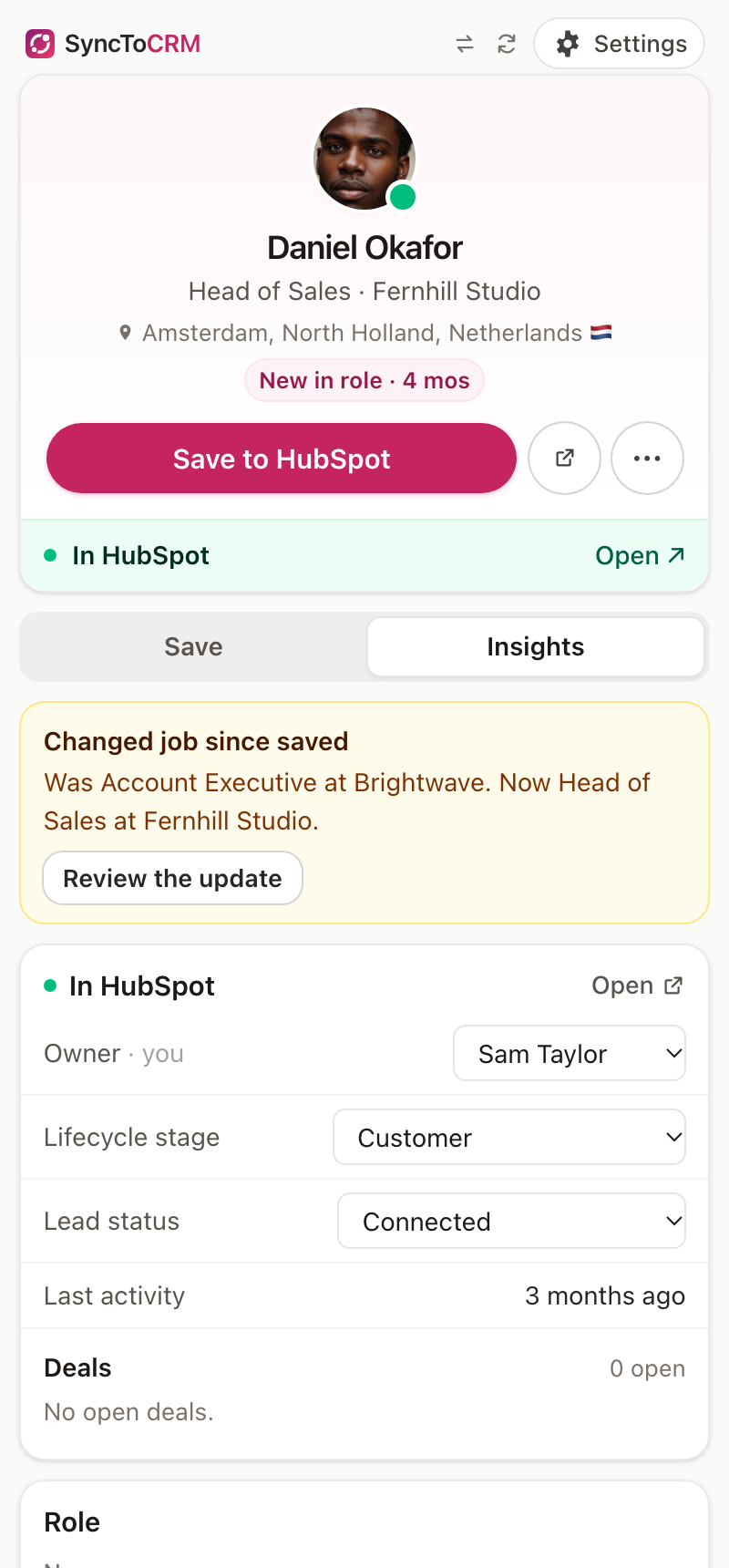
Spot job changes as you browse
When someone in your CRM has a new title or company on LinkedIn, you'll see it as soon as you open their profile. One click updates HubSpot, adds a timeline note and sets a "LinkedIn job change" date you can filter lists on.
- Checked only when you open the profile. Nothing runs in the background
- Job changes you've seen wait in one list, to update when it suits you
- A "New in role" tag for people less than six months into a job
The details
Small things that save a lot of clicks
Log LinkedIn messages
A Log button on every open conversation saves it to the contact's HubSpot timeline. Messages already saved are skipped.
Sales Navigator
The same button on Sales Navigator lead and account pages. Leads are recognised on their regular LinkedIn profile too.
Notes, follow-ups and lists
Add a note, a follow-up task a few days out and a HubSpot list as you save. The list is remembered for next time.
Company pages
Add a company from its LinkedIn page in one click, with website, industry and location, or open it if it's already in HubSpot.
Your fields, your defaults
Pick the HubSpot field for each detail, custom fields included. Set the owner, lifecycle stage and lead status once.
Never fails silently
If LinkedIn changes a page and a detail can't be read, the panel says which one and lets you type it in.
Keeps working after updates
LinkedIn tabs that were open during an extension update carry on without a refresh.
Fast with a keyboard
Alt+Shift+S opens the panel. Cmd+Enter, or Ctrl+Enter on Windows, saves.
Chrome and EdgeTesting
Works in Google Chrome and Microsoft Edge. Brave and Arc should work too.
Safe by design
It only reads the page you're looking at
LinkedIn restricts accounts that use tools to automate activity. SyncToCRM never acts on LinkedIn for you, and asks for as little access as it can.
On LinkedIn, it never
- visits profiles or pages for you
- sends messages, invitations or likes
- scrolls, crawls or loads pages in the background
- reads your inbox: only conversations you have open
To you, it never
- sells, shares or keeps a copy of your data
- charges credits per contact
- pops up asking for reviews
- opens itself or covers LinkedIn's buttons
linkedin.com
To read the page you have open, when you use it.
Your HubSpot
To find and save contacts in your own account.
Pricing
Free while in beta
Use everything at no cost while we're in beta. After it, a free plan stays, and Pro starts at $9 a month. No credits.
In beta now: everything is free, with no limits and no card. Join during the beta and keep Pro at $9 a month for as long as you stay subscribed.
Plans after the beta
Free
No card needed
For trying it, or adding a few people a month.
- Save 20 people or companies to HubSpot a month
- See who's already in HubSpot on every profile, with no limit
- Never overwrites a field. Never creates a duplicate.
- Links the right company, and asks when it isn't sure
- Add a note, a follow-up task or a list as you save
- Log a LinkedIn conversation with one click
Pro
or $9 a month billed yearly ($108)
For anyone who prospects on LinkedIn every week.
- Everything in Free, with no monthly limit
- Log open conversations to HubSpot automatically
- Works on Sales Navigator lead and account pages
- Spot job changes when you open a profile, and update HubSpot in one click
- No credits, no per-contact charges
Team
for up to 5 people, or $29 a month billed yearly
For small teams sharing one HubSpot.
- Pro for everyone on the team, about $8 a person
- See who owns a contact before you reach out, so two people don't message the same person
- One invoice, one admin
- Set up fields, owner and list once for the whole team (coming)
More than 5 people? Email us. Prices in US dollars, plus VAT where it applies. We'll email you before the beta ends, and nothing is charged unless you choose a paid plan.
Changelog
What's new
SyncToCRM is in beta and changes quickly. Here's what shipped recently.
One click from LinkedIn, Sales Navigator and message logging
Teammate warning, notes, follow-ups and companies
Ready for LinkedIn's 2026 profile layout
FAQ
Questions, answered
What does SyncToCRM do?
It adds the LinkedIn profile you're looking at to HubSpot in one click, shows whether the person is already in HubSpot, and never makes a mess of the records you already have.
Will it overwrite what's already in HubSpot?
No. SyncToCRM never empties a field. On an existing contact it fills only the fields that are empty in HubSpot. Where HubSpot and LinkedIn differ, it shows both and keeps HubSpot's unless you choose to replace it.
Will it create duplicates?
It checks first by LinkedIn address, LinkedIn's own member ID and email, and checks again right before creating. If someone with the same name exists but nothing proves it's the same person, it asks you rather than guessing.
Is it safe for my LinkedIn account?
SyncToCRM never acts for you on LinkedIn: it doesn't visit profiles, send messages, connect or scroll through pages by itself. It only reads the page you're looking at, when you use it. Tools that crawl LinkedIn or sync your inbox in the background are the ones that get accounts restricted.
What can the extension access?
Only linkedin.com (to read the page you have open) and HubSpot (to save). It doesn't ask for access to other websites. See every permission and why.
Does it work in Sales Navigator?
Yes, on lead pages (linkedin.com/sales/lead/…) and account pages (linkedin.com/sales/company/…): the same Add to HubSpot / View in HubSpot button sits next to Save and Message. A contact added from Sales Navigator is recognised on their regular LinkedIn profile, and the other way round, because both carry LinkedIn's member ID.
Which browsers does it work in?
Chrome and Microsoft Edge. Other Chromium browsers (Brave, Arc) should work but aren't tested yet.
Which CRMs does it work with?
HubSpot today. Pipedrive is planned next, then Attio or Zoho. Tell us which CRM you use when you join the beta; it decides the order.
How much does it cost?
Free while in beta. After the beta: a free plan with 20 saves a month, Pro at $12 a month ($9 a month billed yearly), and Team at $39 a month for up to 5 people. No credits. Join during the beta and keep Pro at $9 a month for as long as you stay subscribed. Pricing.
More in Support, or email support@synctocrm.com.
Stop copying LinkedIn profiles into HubSpot by hand
Join the beta and we'll send you the extension and a short setup guide.
Thanks, you're on the list. We'll email you the extension and a short setup guide.
We'll only email you about SyncToCRM (privacy policy). Free while in beta, no card needed.